“Recently I repartitioned one of my existing hard drive, I thought that repartitioning process was successful. But, now one of the partition is inaccessible and displaying some error message as 'Disk unmounted'. I went through few forums and tried to solve this issue, but unfortunately I was unable to solve it. Is there any appropriate solution to recover my valuable data from unmounted partition? Thanks in advance!!!
Hard drive is very essential part of computer which holds important data on it. Any irregularities in hard drive would lead to malfunctioning of the drives. Behind smooth running of Windows system there may exist some annoying situations which you cannot handle. However most of the people try to resolve the issues and later regret for their mistakes. In above mentioned situation, user might have improperly partitioned hard drive which turned it to unmounted one making entire data inaccessible.
- File system corruption: When computer crashes all of a sudden due to file system corruption, then partition does not mount on your Windows computer
- Partitioning Error: Some programs are used to partition the hard drive into different drives. If any interruption occurs in between or if the partitioning tool is not reliable one then, it may dismiss the process and make the partition unmounted
- Reformatting: Converting file system from older version to newer one (for example FAT to NTFS) and vice versa will result in inaccessibility of partition
- File registry: File registry corruption may also stop the accessibility of partitions making it unmountable on Windows computer
If you get through these situations, then don't worry!! There are many file recovery tools available online by utilizing them you can bring back data from unmounted partition. If you are looking for proficient software, then you can opt for Yodot Hard Drive Recovery tool.
Unmountable partition recovery tool:
Yodot Hard Drive Recovery is outstanding tool to recover data from unmounted partition on Windows operating system. This app is highly reliable because it does not write single byte to drive or partition from where it is retrieving data. With the usage of this software, files like Microsoft Office files, documents, compressed files, program files, folders, database and so on can be restored from internal and external hard drive. This tool also restores data from ATA hard drive, USB drives, iPods, memory card, SSD drives, FireWire drives and other storage devices. It is capable of recovering data from hard disk drive formatted with FAT16, FAT32, ExFAT, NTFS, ReFS and NTFS5 file systems. This utility is compatible on Windows 32 bit and 64 bit operating systems like Windows 7, Windows 8, Windows 8.1, Windows Vista, Windows XP, Windows Server 2008 and Windows Server 2003.
Steps to recover unmounted partition:
- Download Yodot Hard Drive Recovery tool on your Windows computer and install it
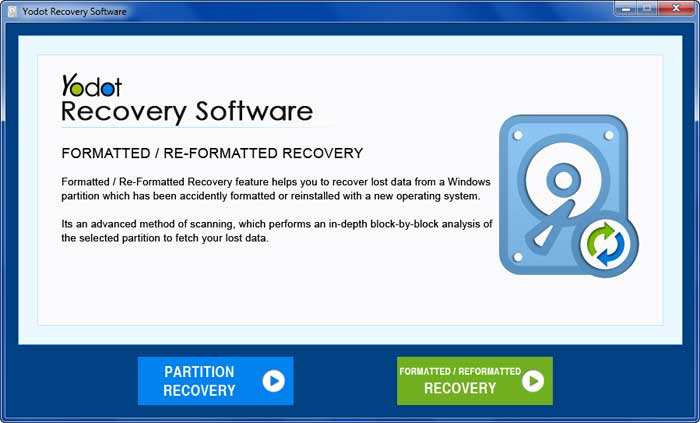
- Now launch the utility and your main screen will pop up with two options like ‘Partition Recovery’ and ‘Formatted/Reformatted Recovery’
- Now select 'Partition Recovery' option and continue next
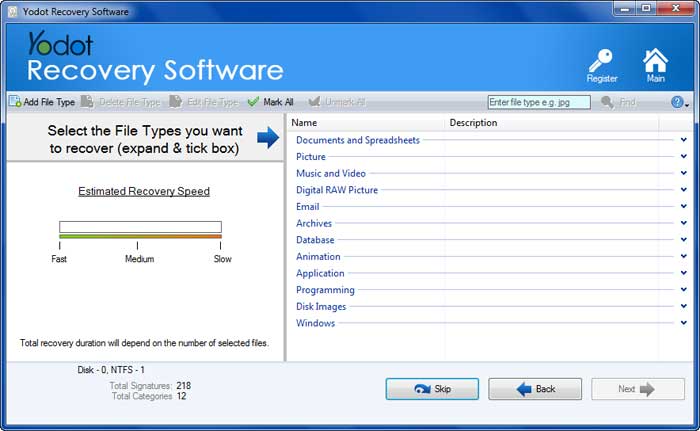
- Now choose the drive in which partition is to be retrieved and choose the file types to be retrieved from it and start with scanning process
- After the completion of scanning process, you can view restored files from complete partition in 'Data View' or 'File Type View'
- Finally use 'Save Recovery Session' option to save scanning information that can be used to resume scanning process after buying the software
- Save recovered files on desired destination location, but not in same old drive. You can even compress those files in ZIP archive
Useful Tips:
- Take regular back up of your vital data on multiple storage devices to avoid data loss
- Always keep your computer virus free
Related Articles

How to Recover Healthy Partition?
Click here to get to know the exact way of recovering healthy partition data from a Windows computer.

How To Recover Files From GPT Protective Partition?
This page helps the user to recover deleted or lost files from GPT partition on Windows computer.
How to Recover Partition That is Deleted in Disk Management?
Step by step procedure to recover deleted partition from disk management on Windows computer hdd.
