Want to know is there a way to recover deleted xbox clips or want to recover lost or deleted saved games from xbox 360? Continue reading this article to recover deleted saved games from Xbox 360 with and without using software.
“I have a configuration of Intel Quad Core Processor with 8GB RAM and 2TB HDD with 2GB Nvidia Geforce GTX 1060. I am a great lover of playing games and also a not so famous game streamer. Unfortunately, I formatted my Xbox 360 hard drive instead of the virus-infected flash drive connected to my system by accident.The formatted Xbox 360 hard drive holds all my favorite games saved from long ago. Can anyone tell me about how to recover saved games from a formatted Xbox 360 hard drive?”
Yes, you can recover deleted saved games from a formatted Xbox 360 hard drive. Before you get to how to recover games from formatted Xbox, you should know about the basics. So, let's start with the basics.
The Xbox 360 hard drive is a high performance gaming console with extra benefits like simple configuration, portability, increased storage capacity, etc. Since most people are crazy about playing games, the Xbox 360 hard drive has gained more popularity. The Xbox 360 hard drive also allows users to download demos of games from the Xbox Live Marketplace. The device even acts as a storage repository for your huge game collection.
Despite having so many conveniences and advantages, games saved on the Xbox 360 hard drive might get deleted or lost due to various reasons. For instance have a look on below listed scenarios:
- Mistakenly deleting favorite games while deleting useless files from Xbox 360 hard disk
- Abnormal ejection of Xbox 360 hard drive during data transfer
- Abrupt system shutdown due to power outage while playing games on Xbox 360 hard drive
- Xbox 360 hard drive corruption due to harmful virus infection
- Using the same Xbox 360 hard drive on multiple platforms like Windows and Mac
- Logical conflicts while configuring Xbox 360 hard drive in system
How Do I Get My Saved Games Data Back From Xbox 360?
Here are a few tried and tested solutions to recover deleted game saves on Xbox 360:
Method 1: Check your Account
Check your account to get back data from Xbox 360.
Note: Make sure that you didn't switch your user account.
To check the account follow the steps:
- Press the Xbox button to launch the guide.
- Go to Profile & System > Settings > Account.
- Now, check and confirm that it is your account.
Method 2: Restart your Xbox 360
Sometimes, restarting the Xbox will help to remove some temporary errors and get back deleted data from Xbox 360.
Steps to reboot the Xbox:
- Click on the Home button > Start > quit.
- Now, open it after a few minutes to see whether your lost saved Xbox game files are there.
Method 3: How to Recover Saved Games From Xbox 360 Hard Drive?
No matter how you lost games from the Xbox 360 hard drive, you can regain them with the aid of professional data recovery software such as Yodot Hard Drive Recovery. This application is among the most used data recovery tools to rescue erased and missing games from Xbox 360 hard disk drives on the Windows system.
Steps to restore games from Xbox 360 hard drive:
- Attach Xbox 360 hard drive to a healthy Windows system and let it get detected
- Download and install Yodot Hard Drive Recovery software to that PC
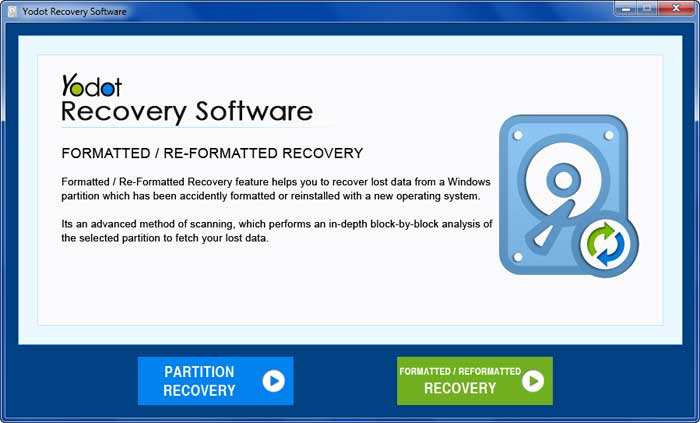
- Run the tool and stick to the main screen instructions
- Use “Partition Recovery” option to extract games from selected partition or use “Formatted / Reformatted Recovery” option to restore games from formatted Xbox 360 hard disk
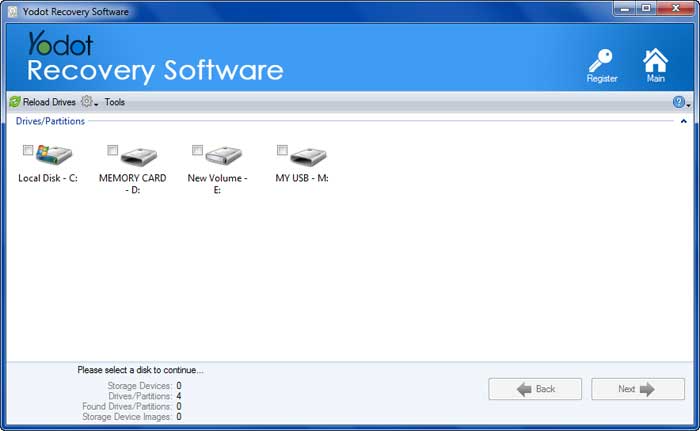
- The program scans and displays all the internal and external drives (Xbox 360 hard drive)
- Choose the Xbox 360 hard drive and click on “Next” button
- The application scans selected drive and displays deleted / missing games from Xbox 360 hard drive
- Select the files and folders which you want to rescue back
- Finally save your retrieved game files to your desired destination location, but not to the same Xbox 360 hard drive which might result in data overwriting
Solution 4: Re-Download the Lost/Deleted Xbox Games Manually.
If you are not willing to try any software to restore lost or deleted game files on Xbox 360, you can choose to download the lost games again.
Here is how to re-download the Xbox file.
- Download and run the Xbox Application.
- Sign in to the application, Go to the Settings menu, click on your Account, and find your Download History.
- Now, in the download history list, you will be able to find the games which you previously downloaded.
- Find the game with the lost file and hit on the download button.
Tip to know about How to increase the chance of recovery
- In order to make successful recovery of deleted or lost games it is recommended to stop using Xbox 360 hard drive after data loss
- For game lovers it is suggested to backup their priceless games on some other storage device
- Do not use Xbox 360 hard drive on incompatible or unauthentic devices
Related Articles

Recovering Data from Unformatted XBOX Hard Drive
Detailed procedure on recovering data from unformatted Xbox hard drive on Windows system.

How to Restore Half Formatted Drive?
Visit this page to know how to extract data from half formatted drive on Windows PC.

Data Recovery from Formatted C Drive
Visit this page to know about recovery of formatted data from C drive on Windows desktop or laptop hard drive.
Recovering Folder Structure from Formatted Drive
Visit this page to retrieve folder structure from formatted drive on your PC.

How to Recover Files from D Drive after Formatting?
Take help of Yodot Hard Drive Recovery program to restore data from formatted D drive
How to Recover Doc Files after Format?
Visit this page to get back your lost Word documents from formatted drive on Windows PC.
