Irrespective of the security or protection provided by Avast antivirus application, yet there is a possibility for unforeseen or accidental deletion of essential files infected by viruses or malwares within fraction of seconds. You might experience difficult situations, where Avast antivirus scan force you to delete virus intrusion files or you may unknowingly delete suspicious files by Avast antivirus software and left with empty hand other than feeling bad for the mistake? It is very disappointing circumstance, however you don’t need to be struggle a lot with such annoying situations. Take assistance of relevant solution specified in this article.
Often users make mistakes like using virus infected external storage devices in some hurry-burry situations; installing invalid third party applications; browsing unauthentic websites and many others in system. And these carelessness or ignorance may leads to severe virus attack on that computer. In such instances, running antivirus software such as Avast to scan entire computer will detect and find virus infected files on system and displays warning message to delete suspicious files contaminated by deadly viruses as well as make you delete those files. At worst cases, users have also filed queries like - how Windows defender deleted my files while removing malware; wherein defender's purpose is to protect data.
When Avast antivirus deletes or make you remove virus infected file completely, don’t conclude that your important files are erased permanently. In fact only address of those files gets vanished from file system table, but not actual content of that file. The operating system marks that file’s storage space as free and the data is still present on that memory location until it gets overwritten by new data. Thereby you can retrieve deleted files by Avast antivirus using any relevant file recovery application.
Software to recover files deleted by Avast antivirus:
You can undelete all your files after Avast antivirus scan within few easygoing steps, using appropriate file retrieval software like Yodot File Recovery. This application can efficiently recover files deleted by Avast antivirus software on Windows computer. One can get back Word files, Excel files, PowerPoint files, PDF files, compressed files, program files and many other files after Avast antivirus scan. It has simple and interactive graphical interface, which made recovery of deleted as well as lost files easily after antivirus scan. In addition, you can restore files form virus infected USB drives, flash media cards, external hard drives, SSD drive and other storage devices. It can also bring back deleted or lost files from FAT, FAT16, FAT32, ExFAT, NTFS and NTFS5 file system formatted storage drives on Windows PC. This application has been specially designed for the different versions of Windows operating systems such as Windows 11, Windows 10, Windows 8, Windows 7, Windows Vista, Windows XP, Windows Server 2008 and 2003.
Steps to retrieve files deleted by Avast antivirus:
- Download Yodot File Recovery software and install it to your Windows desktop or laptop
- Launch the application and follow the on-screen directives
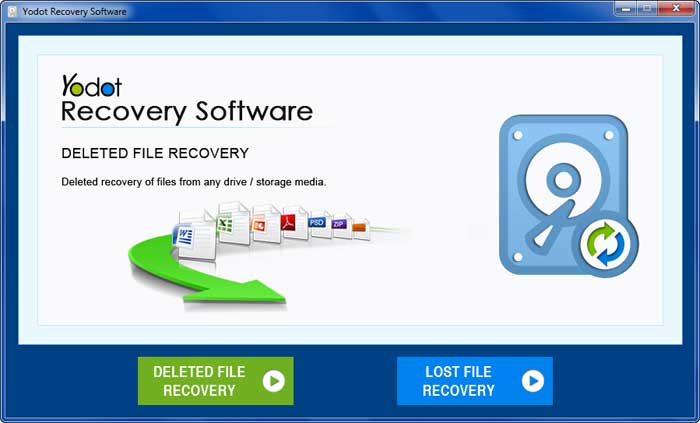
- Later select “Deleted File Recovery” option from main screen to regain deleted files by Avast antivirus application
- Next you will find list of partitions or drive present on your system
- Choose the partition or drive from where you have to undelete files
- Let the program to scan Windows partition completely
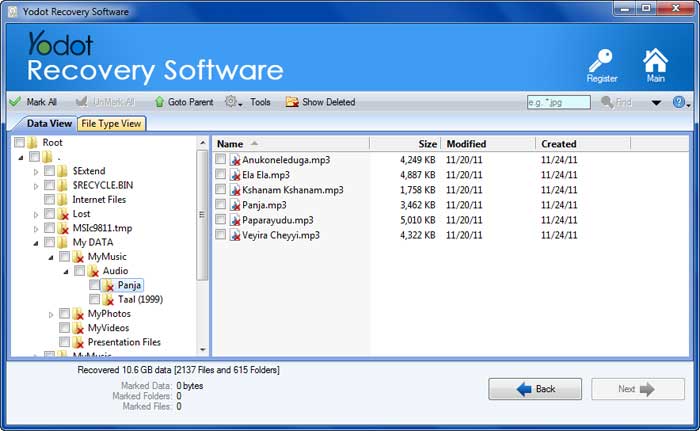
- Now this tool displays all erased files, to view restored files you can switch between two options i.e. “Data view” or “File type view”
- Mark the files from the list, which you want to recover back and click on “Next” button
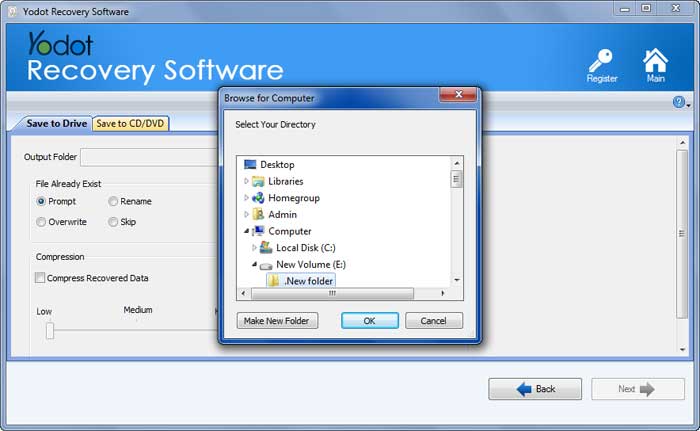
- At the end, browse for location as per your wish to save rescued files on system or other external storage devices; but not to the same partition from where you retrieved those files
Tips to be considered:
- Confirm twice before responding to any warning message shown by Avast antivirus software
- Try to avoid using virus infected devices, installing unauthentic third party apps or accessing unsafe websites on system
- Backup essential files on external storage devices to be at safer side at the time of unforeseen deletion of files