
Formatting a hard drive is an important thing to do because it makes the drive brand new. It erases all the data on it, so it’s empty and can be used again for storing new stuff. But be careful when you format because it deletes everything permanently, and getting back the erased data is hard or sometimes not possible. In this guide, we’ll explain why and when people format their hard drives in easy terms.
So, let’s get started on this data rescue mission and retrieve your valuable files from the formatted hard drive!
What Happens When You Format a Hard Drive?
When you format a hard drive, all the data stored on it is completely erased, leaving the drive empty and ready for new information. Remember to back up your important files before formatting, as this process is irreversible, and you won’t be able to recover the erased data. Be cautious and prepared when performing a format to avoid permanent data loss.
Note: Formatting a hard drive permanently erases all data, so back up important files before doing it to prevent losing data.
When Can You Format Your Hard Drive?
You can format your hard drive in the following situations:
| Removing Your Data | When you want to erase all data on the hard drive permanently. |
| Computer Fails to Boot | If your computer fails to start properly or encounters boot issues, formatting the hard drive can help resolve the problem. |
| Computer Running Slowly | When your computer runs very slowly, formatting the hard drive can help improve overall performance by removing unnecessary files and software. |
| During OS Update | Formatting the hard drive before updating the operating system ensures a clean installation and minimizes the chances of compatibility issues or errors. |
| Hard Drive Becomes Full | When your hard drive runs out of storage space, formatting can help reclaim storage by erasing unnecessary files and optimizing disk usage. |
| Registry Errors | If your system encounters errors related to the system registry, formatting the hard drive and reinstalling the operating system can help resolve these issues. |
| Troubleshooting | If our computer keeps having problems or crashes because of software issues, formatting the hard drive and reinstalling everything can often fix those problems. |
| Disk Cleanup | After using a computer for a long time, it might become slower due to many unnecessary files. Formatting the hard drive helps clean it up and makes the computer run faster again. |
Alert: Make sure you take a backup of your computer before formatting the drive.
Is It Possible to Recover a Formatted Hard Drive?
Yes, you can! If you accidentally format your hard drive, there’s still hope to get back your lost data, as long as new data hasn’t overwritten it.
To recover files from a formatted hard drive, stop using the disk immediately to avoid overwriting the data. You can try the following working methods:
Yodot Hard Drive Recovery Tool: Use Yodot Hard Drive Recovery software, a reliable tool designed to recover data from formatted hard drives.
Recycle Bin: Check the Recycle Bin (Windows) or Trash (Mac) for recently deleted files after formatting.
Previous Backup: If you have a previous backup of your data before formatting, you can restore the files from the backup source.
Try these methods to increase your chances of successful data recovery after the format. Go ahead and give them a try!
Method 1: How to Recover Formatted Hard Drive Using Yodot Hard Drive Recovery Tool
Yodot Hard Drive Recovery Tool is software that helps you retrieve lost or deleted data from hard drives and other storage devices. It scans for and restores accidentally deleted, formatted, or lost files like documents, photos, and videos. Just download, install, connect your device, scan, preview, and save the recovered files. It’s a reliable solution for data recovery, but avoid using the affected drive until the process is complete for better success.
Step 1: Download and install Yodot Hard Drive Recovery software.
Step 2: Click on the “Formatted/Reformatted Recovery” button.
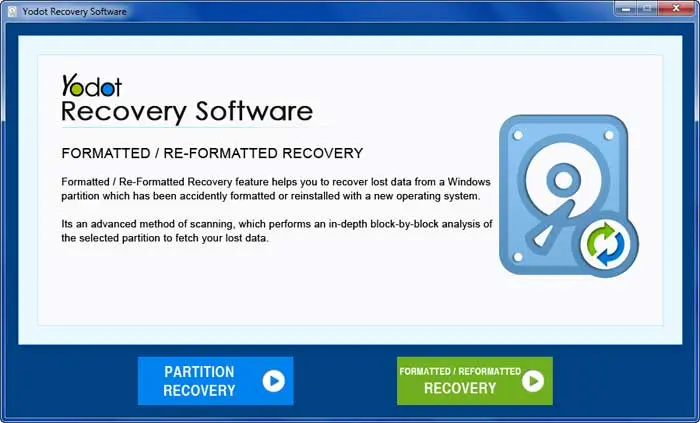
Step 3: Choose the formatted external hard drive from the list and click Next.
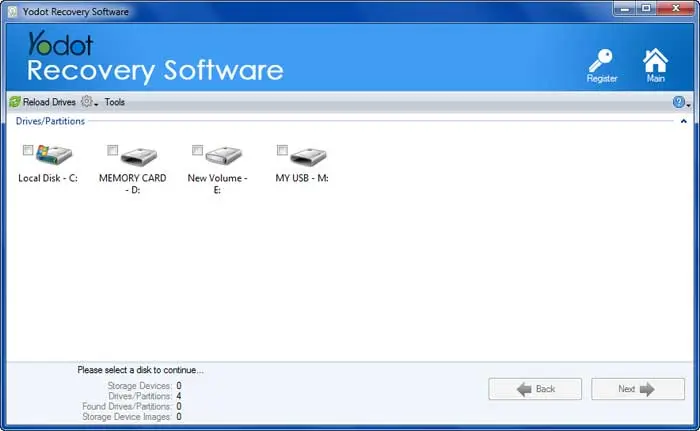
Step 4: After a quick scan, select the partition from which you want to recover data.
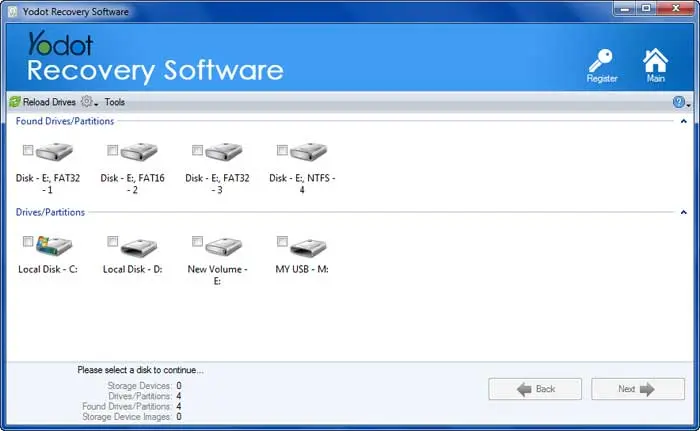
Step 5: The tool will deep scan the selected partition and display recovered data.
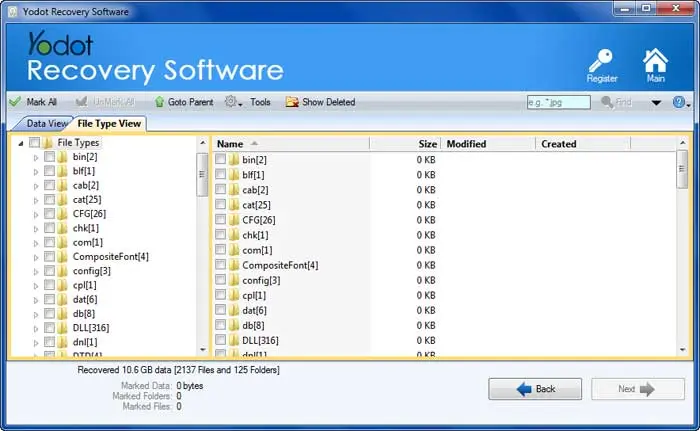
Step 6: Select your required files and preview them.

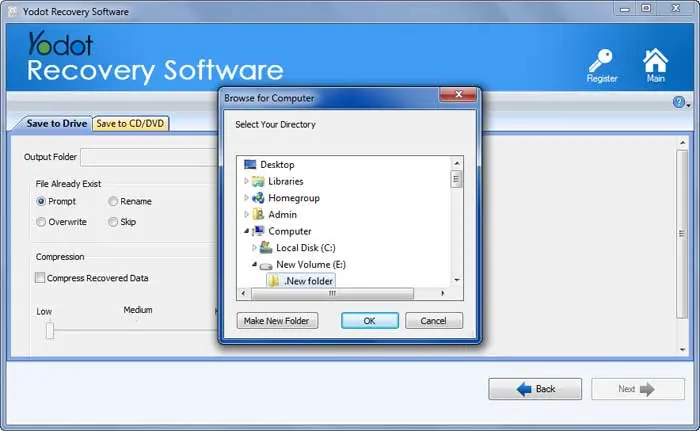
Step 7: Finally, save the recovered data from the formatted external hard drive onto your computer’s HDD.
Method 2: Recover Data from the Formatted Hard Drive Using Recycle Bin
Step 1: Open the Recycle Bin (Windows) or Trash (Mac) on your computer.
Step 2: Look for any files or folders from the formatted hard drive in the Recycle Bin or Trash.
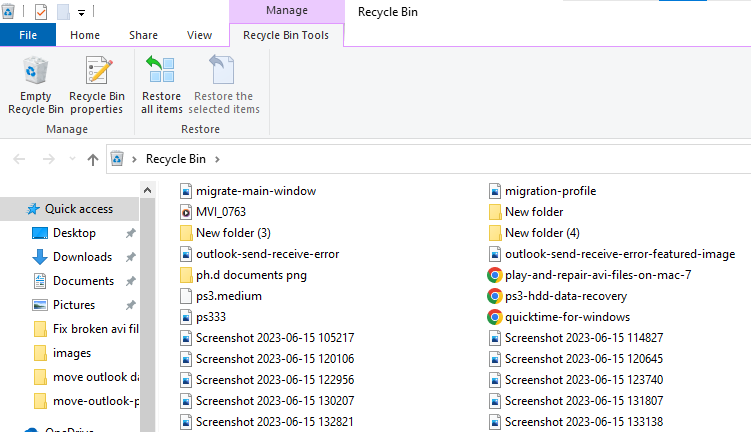
Step 3: If you find any recoverable files, right-click on them and select “Restore” (Windows) or drag them out of the Trash and drop them to a desired location (Mac).
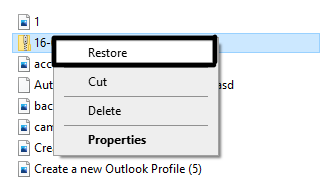
Step 4: The restored files will be back to their original location.
Method 3: Recover Data from the Formatted Hard Drive Using the Previous Backup
Step 1: Check if you had created a backup of your data before formatting. Locate the backup source, which can be an external hard drive, cloud storage, or any other backup medium.
Step 2: Access the backup source and find the files you want to recover.
Step 3: Copy the files from the backup source and paste them to the desired location on your computer.
By following these steps, you can successfully recover your lost data from the backup source and have it back on your computer after formatting the hard drive. Having a backup before formatting is an excellent practice to safeguard your important files and ensure you can easily retrieve them when needed.
Conclusion:
In conclusion, you can recover files from a formatted hard drive using different Manual methods like checking the Recycle Bin or using previous version backups may help if the formatting was not complete. However, for more reliable and comprehensive recovery, it’s recommended to use specialized data recovery software like Yodot Hard Drive Recovery Tool. Remember to act quickly, avoid using the formatted drive, and keep backups to safeguard your important files.
Frequently Asked Questions:
Having a backup of your important files is highly recommended to avoid data loss during formatting. Regular backups help you restore data easily.
To prevent accidental formatting, be cautious while performing disk operations, keep important data backed up, and double-check before formatting any drive.
Stop using the formatted hard drive, avoid saving new data on it, and use data recovery software as soon as possible to increase recovery chances.
Formatting action just rewrites the partition table and overwrites all the files in your storage drive. The file system is reconstructed according to the needs of the user and software. Formatting can be used to erase all data on a drive and get rid of a corrupted file system. It is usually recommended when you are unable to access your data due to corruption but you will also lose all the data on it.
While factory reset deletes data and brings the device back to its default state, Formatting refers to the process of preparing a device for use, it could be taking an SD card and formatting it to work with a particular camera or formatting a hard for a new OS
Without a backup, the chances of recovering your formatted files are lower and uncertain. The chances of success will depend on the type of formatting, the time taken to act, and the condition of the data in question.
